MakeChecked blueprint9 nodes
AI lead score into GoHighLevel and a text
Score a webhook lead, upsert the contact in GoHighLevel, and text them when the score clears 75.
Portfolio reference build with demo data and placeholder credentials, not a client deployment.
Pain
Stops reps from manually copying web forms, guessing lead quality, and researching prospects before calling. Bad fits get filtered; hot buyers land with a full brief.
Solution
Score a webhook lead, upsert the contact in GoHighLevel, and text them when the score clears 75.
Impact · From the blueprint
The manual create-and-text loop is about 4 minutes a lead. Ten leads a day is most of an hour.
- Intermediate
- Validated
- Auto path
- Webhooks
- OpenAI
- GoHighLevel
- Twilio
- Slack
- Google Sheets
Library status: documented blueprint, structurally validated. Checked against Make's blueprint shape and a module allowlist. Not imported into a Make account.
Step inspector
The first step shows the checked-in sample payload.Later steps name the node. They are not a live execution.
Guardrails
No approval, retry, or demo-gate node was detected by name. Read the README before connecting live credentials.
Credential ids in the JSON are placeholders. These files are portfolio demos.
Deploy this for your business
Tell us this slug and what still happens by hand. We will map it onto your accounts. This page is not a claim that the blueprint already runs for a customer.
README
Portfolio demo by Mustafa (mustafaautomation). Not client work. Connect your own accounts after import. Live walkthroughs, when published, sit on a subdomain of quvantic.com.
Category: Lead gen and CRM
Difficulty: intermediate
Apps: Webhooks, OpenAI, GoHighLevel, Twilio, Slack, Google Sheets
Test status: documented blueprint, structurally validated
Problem
Agencies running GoHighLevel still paste Facebook and website leads in by hand, then forget the text. This demo scores the message, creates the contact through the LeadConnector API, and sends one SMS only when the score is high enough to deserve a same-hour reply.
Who it's for
Automation freelancers building speed-to-lead for agencies that live in GoHighLevel rather than HubSpot.
Module-by-module walkthrough
Ids match the blueprint. A router runs every route whose filter passes. An error handler runs only when that module throws.
1. Catch the lead webhook
gateway:CustomWebHook · Custom webhook · Webhooks
A form, a funnel, or a Make-friendly ads tool posts the lead here.
No mapped fields. Configure the module after import, or it only passes the bundle through.
2. Score urgency
openai-gpt-3:CreateCompletion · Create a completion · OpenAI
Looks for a same-day ask, a headcount, or a budget. Returns JSON.
select:"chat"model:"gpt-4o-mini"max_tokens:"250"temperature:"0.2"messages:[{"role": "system", "content": "You score inbound leads for a GoHighLevel agency. Return JSON only: score (0-100), reason (one sentence)."}, {"role": "user", "content": "Lead: {{1.first_name}} {{1.last_name}}, {{1.ema...
3. Alert scoring failure — error handler
slack:CreateMessage · Send a message · Slack
GHL lead scoring failed for {{lead.email}}.
channelWType:"list"channelType:"public"channel:""text:"GHL lead scoring failed for {{1.email}}."mrkdwn:trueparse:false
4. Retry (Break) — error handler
builtin:Break · Retry (Break) · Flow control
Scoring failed. Retry so the contact is not created blind.
retry:truecount:3interval:15
5. Parse the score
json:ParseJSON · Parse JSON · JSON
Exposes score and reason.
json:"{{2.result}}"
6. Create the GoHighLevel contact
http:ActionSendData · Make a request · HTTP
Creates the contact even when the score is modest. The text is the part that stays gated.
url:"https://services.leadconnectorhq.com/contacts/"serializeUrl:falsemethod:"post"headers:[{"name": "Accept", "value": "application/json"}, {"name": "Content-Type", "value": "application/json"}, {"name": "Authorization", "value": "Bearer YOUR_API_KEY"}, {"name": "Version", "value": "2021-07-28"}]qs:[]bodyType:"raw"parseResponse:truecontentType:"application/json"data:"{\"firstName\":\"{{1.first_name}}\",\"lastName\":\"{{1.last_name}}\",\"email\":\"{{1.email}}\",\"phone\":\"{{1.phone}}\",\"source\":\"{{1.source}}\",\"locationId\":\"YOUR_GHL_LOCATION_ID\",\"tags\":[\"portfolio-demo\...timeout:""shareCookies:falseca:""rejectUnauthorized:truefollowRedirect:trueuseQuerystring:falsegzip:trueuseMtls:falsefollowAllRedirects:false
7. Alert GHL failure — error handler
slack:CreateMessage · Send a message · Slack
GoHighLevel contact failed for {{lead.email}}.
channelWType:"list"channelType:"public"channel:""text:"GoHighLevel contact failed for {{1.email}}."mrkdwn:trueparse:false
8. Retry (Break) — error handler
builtin:Break · Retry (Break) · Flow control
GoHighLevel rejected the contact. Retry before texting anyone.
retry:truecount:3interval:15
9. Log the lead
google-sheets:addRow · Add a row · Google Sheets
Keeps a copy outside the CRM so a failed text is still visible.
from:"drive"mode:"select"spreadsheetId:""sheetId:""includesHeaders:trueinsertDataOption:"INSERT_ROWS"valueInputOption:"USER_ENTERED"values:{"0": "{{now}}", "1": "{{1.email}}", "2": "{{1.phone}}", "3": "{{5.score}}", "4": "{{5.reason}}", "5": "{{6.data.contact.id}}"}
10. Text only the hot ones
builtin:BasicRouter · Router · Flow control
A single filtered route. Leads under 75 stay in the CRM and the sheet, with no SMS.
11. Text the lead — route Text the lead
twilio:SendSMS · Send an SMS · Twilio
Uses the Twilio number you set in YOUR_TWILIO_NUMBER. The body does not pretend a human already read the form.
Filter Score at least 75: [[{"a": "{{5.score}}", "o": "number:greaterorequal", "b": "75"}]]
to:"{{1.phone}}"from:"YOUR_TWILIO_NUMBER"message:"Hi {{1.first_name}}, this is Northwind. We got your note and will call within the hour."
12. Tell the owner — route Text the lead
slack:CreateMessage · Send a message · Slack
The channel sees the score so the call is not a cold open.
channelWType:"list"channelType:"public"channel:""text:"*Call now* {{1.first_name}} {{1.phone}} — {{5.score}}. {{5.reason}}"mrkdwn:trueparse:false
13. Log the quiet lead — route Quiet log
slack:CreateMessage · Send a message · Slack
So the channel can see that the contact exists and nobody was texted.
Filter Below 75: [[{"a": "{{5.score}}", "o": "number:less", "b": "75"}]]
channelWType:"list"channelType:"public"channel:""text:"Logged {{1.email}} in GoHighLevel at {{5.score}}. No text sent."mrkdwn:trueparse:false
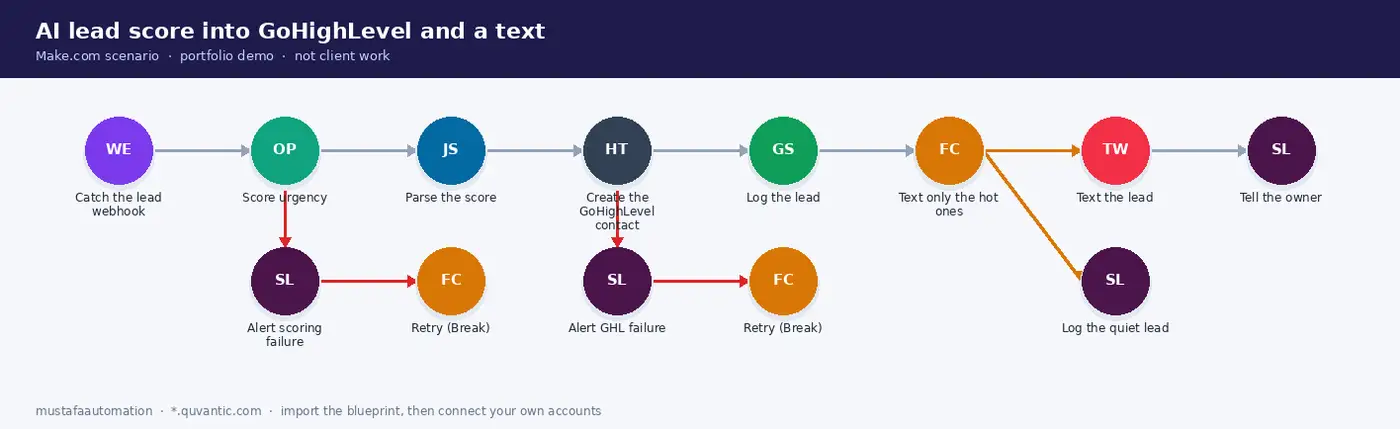
Diagram
flowchart LR
  lead(("1 · Catch the lead webhook"))
  score(("2 · Score urgency"))
  lead --> score
  score -->|"error"| score_alert
  score_alert(("3 · Alert scoring failure"))
  score_directive(("4 · Retry (Break)"))
  score_alert --> score_directive
  parsed(("5 · Parse the score"))
  score --> parsed
  ghl(("6 · Create the GoHighLevel contact"))
  parsed --> ghl
  ghl -->|"error"| ghl_alert
  ghl_alert(("7 · Alert GHL failure"))
  ghl_directive(("8 · Retry (Break)"))
  ghl_alert --> ghl_directive
  log(("9 · Log the lead"))
  ghl --> log
  text{"10 · Text only the hot ones"}
  log --> text
  sms(("11 · Text the lead"))
  ping(("12 · Tell the owner"))
  sms --> ping
  text -->|"Text the lead"| sms
  quiet(("13 · Log the quiet lead"))
  text -->|"Quiet log"| quiet
Setup
- In Make, create a scenario, open the three-dot menu at the bottom of the editor, and choose Import Blueprint. Select
blueprint.json. - Open every red module and pick or create the connection. Red means the account is not selected yet.
- Schedule: Immediately, from the webhook.
- Create the spreadsheet tab this scenario expects, with a header row in row 1:
- A received_at
- B email
- C phone
- D score
- E reason
- F ghl_contact_id
- Select that spreadsheet and sheet on every Google Sheets module. The ids are blank in the file.
- Run once with the bundled
sample-input.json. Fictional payload. Paste it into the first module when you run the scenario once. - Check the output bundle of each module before you turn the schedule on.
Connections
- OpenAI — create a connection and select it on every OpenAI module. The blueprint leaves
__IMTCONN__unset on purpose. - Slack — create a connection and select it on every Slack module. The blueprint leaves
__IMTCONN__unset on purpose. - Google Sheets — create a connection and select it on every Google Sheets module. The blueprint leaves
__IMTCONN__unset on purpose. - Twilio — create a connection and select it on every Twilio module. The blueprint leaves
__IMTCONN__unset on purpose.
Replace these placeholders in the HTTP modules before the first live run:
YOUR_API_KEYYOUR_GHL_LOCATION_IDYOUR_TWILIO_NUMBER
Nothing in the file is a live connection id, webhook URL, or API key. Make rejects another team's connection id at import, so the slots are empty on purpose.
Data mapping
References use the module id: {{1.subject}} is the subject field of module 1. Sheets columns are zero-based and backticked ({{1.0}} is column A) so a renamed header does not break the map.
- GoHighLevel's public contacts endpoint is POST https://services.leadconnectorhq.com/contacts/. The Version header in this blueprint is 2021-07-28.
- The contact id comes back on the HTTP module. The sheet maps
{{ghl.data.contact.id}}. If your first run shows the id one level up, point the cell at that path instead. - The native HighLevel module in Make can replace the HTTP step after you confirm its module id in your account. This file uses HTTP because that module id was not in the public blueprint corpus this library trusts.
Error handling
Scenario settings: maxErrors 3, dlq true, sequential false, autoCommit true. After this many consecutive failed runs Make deactivates a scheduled scenario.
- Module 2 (Score urgency) handles errors with
builtin:Break. Scoring failed. Retry so the contact is not created blind. - Module 6 (Create the GoHighLevel contact) handles errors with
builtin:Break. GoHighLevel rejected the contact. Retry before texting anyone. - Router 10 (Text only the hot ones) A single filtered route. Leads under 75 stay in the CRM and the sheet, with no SMS.
- Text the lead. One SMS, then a Slack note to the owner. Filter: Score at least 75.
- Quiet log. Acknowledge in Slack without texting. Filter: Below 75.
- Module 11 runs only when filter Score at least 75 passes. A blocked bundle stops on that path. It is not an error.
- Module 13 runs only when filter Below 75 passes. A blocked bundle stops on that path. It is not an error.
Customization
- Put the location id your agency uses into the body. The demo leaves locationId as YOUR_GHL_LOCATION_ID.
- Rewrite the SMS. It is one sentence on purpose.
- Drop the Twilio route if the client only wanted the CRM write.
- Swap any
YOUR_*value for the id from your own account. Do not commit the filled-in file. - Duplicate the scenario before you change the prompt, so you can diff against this demo later.
Time saved
The manual create-and-text loop is about 4 minutes a lead. Ten leads a day is most of an hour.
Files
| File | What it is |
|---|---|
blueprint.json | Import this into Make. |
sample-input.json | Fictional bundle for the first run. |
diagram.png | Flow diagram. |
diagram.mmd | Mermaid source for the same flow. |