MakeChecked blueprint8 nodes
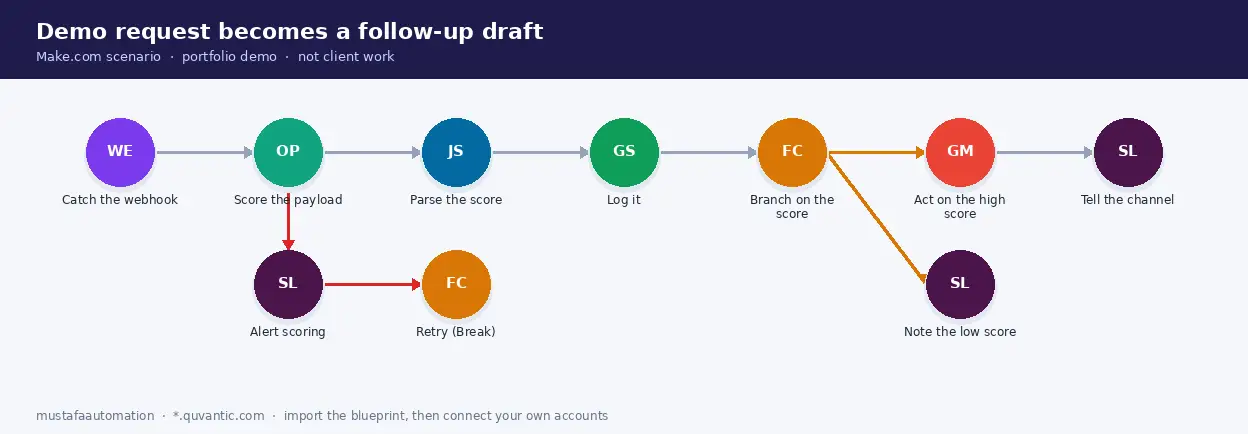
Demo request becomes a follow-up draft
Draft a demo follow-up when the request names a tool and a date. Leave a quiet note otherwise.
Portfolio reference build with demo data and placeholder credentials, not a client deployment.
Pain
Ends the “we saw your inquiry tomorrow morning” leak. A new ad or web lead gets a personal SMS or email and a Slack alert.
Solution
Draft a demo follow-up when the request names a tool and a date. Leave a quiet note otherwise.
Impact · From the blueprint
About 5 minutes a qualified demo request.
- Intermediate
- Validated
- Draft / approval
- Webhooks
- OpenAI
- Google Sheets
- Gmail
- Slack
Library status: documented blueprint, structurally validated. Checked against Make's blueprint shape and a module allowlist. Not imported into a Make account.
Step inspector
The first step shows the checked-in sample payload.Later steps name the node. They are not a live execution.
Guardrails
- Act on the high score
Credential ids in the JSON are placeholders. These files are portfolio demos.
Deploy this for your business
Tell us this slug and what still happens by hand. We will map it onto your accounts. This page is not a claim that the blueprint already runs for a customer.
README
Portfolio demo by Mustafa (mustafaautomation). Not client work. Connect your own accounts after import. Live walkthroughs, when published, sit on a subdomain of quvantic.com.
Category: Speed to lead
Difficulty: intermediate
Apps: Webhooks, OpenAI, Google Sheets, Gmail, Slack
Test status: documented blueprint, structurally validated
Problem
Demo requests that say 'sometime' and demo requests that say 'before the board meeting on the 12th' get the same inbox treatment. This demo drafts the reply only when a date or a tool is named.
Who it's for
Consultants who book demos from a site form and still write each reply by hand.
Module-by-module walkthrough
Ids match the blueprint. A router runs every route whose filter passes. An error handler runs only when that module throws.
1. Catch the webhook
gateway:CustomWebHook · Custom webhook · Webhooks
The form posts JSON to this hook. Parameters stay empty so Make creates the hook on import.
No mapped fields. Configure the module after import, or it only passes the bundle through.
2. Score the payload
openai-gpt-3:CreateCompletion · Create a completion · OpenAI
Returns JSON with a numeric score and a one-sentence reason.
select:"chat"model:"gpt-4o-mini"max_tokens:"300"temperature:"0.2"messages:[{"role": "system", "content": "Score a demo request. Return JSON only: score (0-100), reason. At least 65 if they named a product area and a timeframe."}, {"role": "user", "content": "{{1.name}} <{{1.email}}> at {{1....
3. Alert scoring — error handler
slack:CreateMessage · Send a message · Slack
Scoring failed.
channelWType:"list"channelType:"public"channel:""text:"Scoring failed."mrkdwn:trueparse:false
4. Retry (Break) — error handler
builtin:Break · Retry (Break) · Flow control
Scoring failed. Retry before the router picks a side.
retry:truecount:3interval:15
5. Parse the score
json:ParseJSON · Parse JSON · JSON
Exposes the numeric field the routes compare.
json:"{{2.result}}"
6. Log it
google-sheets:addRow · Add a row · Google Sheets
The row is written before the route, so both outcomes have an audit line.
from:"drive"mode:"select"spreadsheetId:""sheetId:""includesHeaders:trueinsertDataOption:"INSERT_ROWS"valueInputOption:"USER_ENTERED"values:{"0": "{{now}}", "1": "{{1.email}}", "2": "{{1.company}}", "3": "{{5.score}}", "4": "{{5.reason}}"}
7. Branch on the score
builtin:BasicRouter · Router · Flow control
The two number filters are mutually exclusive.
8. Act on the high score — route High
google-email:ActionCreateDraft · Create a draft · Gmail
This module runs only on the high route.
Filter At or above the line: [[{"a": "{{5.score}}", "o": "number:greaterorequal", "b": "65"}]]
from:""to:["{{1.email}}"]cc:[]bcc:[]replyTo:""subject:"Demo for {{1.company}}"html:"<p>Hi {{1.name}},</p><p>We can do the demo. {{5.reason}}</p>"attachments:[]
9. Tell the channel — route High
slack:CreateMessage · Send a message · Slack
The channel sees why this route ran.
channelWType:"list"channelType:"public"channel:""text:"Demo draft ready for {{1.company}}."mrkdwn:trueparse:false
10. Note the low score — route Low
slack:CreateMessage · Send a message · Slack
So the channel can see the lead was stored and not contacted.
Filter Below the line: [[{"a": "{{5.score}}", "o": "number:less", "b": "65"}]]
channelWType:"list"channelType:"public"channel:""text:"Demo logged without a draft: {{1.email}} score {{5.score}}."mrkdwn:trueparse:false
Diagram
flowchart LR
  lead(("1 · Catch the webhook"))
  model(("2 · Score the payload"))
  lead --> model
  model -->|"error"| model_alert
  model_alert(("3 · Alert scoring"))
  model_directive(("4 · Retry (Break)"))
  model_alert --> model_directive
  parsed(("5 · Parse the score"))
  model --> parsed
  log(("6 · Log it"))
  parsed --> log
  band{"7 · Branch on the score"}
  log --> band
  high(("8 · Act on the high score"))
  high_ping(("9 · Tell the channel"))
  high --> high_ping
  band -->|"High"| high
  low(("10 · Note the low score"))
  band -->|"Low"| low
Setup
- In Make, create a scenario, open the three-dot menu at the bottom of the editor, and choose Import Blueprint. Select
blueprint.json. - Open every red module and pick or create the connection. Red means the account is not selected yet.
- Schedule: Immediately.
- Create the spreadsheet tab this scenario expects, with a header row in row 1:
- A received_at
- B email
- C company
- D score
- E reason
- Select that spreadsheet and sheet on every Google Sheets module. The ids are blank in the file.
- Run once with the bundled
sample-input.json. Fictional payload. Paste it into the first module when you run the scenario once. - Check the output bundle of each module before you turn the schedule on.
Connections
- OpenAI — create a connection and select it on every OpenAI module. The blueprint leaves
__IMTCONN__unset on purpose. - Slack — create a connection and select it on every Slack module. The blueprint leaves
__IMTCONN__unset on purpose. - Google Sheets — create a connection and select it on every Google Sheets module. The blueprint leaves
__IMTCONN__unset on purpose. - Gmail — create a connection and select it on every Gmail module. The blueprint leaves
accountunset on purpose.
Nothing in the file is a live connection id, webhook URL, or API key. Make rejects another team's connection id at import, so the slots are empty on purpose.
Data mapping
References use the module id: {{1.subject}} is the subject field of module 1. Sheets columns are zero-based and backticked ({{1.0}} is column A) so a renamed header does not break the map.
- Routes compare
{{parsed.score}}with 65 using number operators, so the two routes do not both run.
Error handling
Scenario settings: maxErrors 3, dlq true, sequential false, autoCommit true. After this many consecutive failed runs Make deactivates a scheduled scenario.
- Module 2 (Score the payload) handles errors with
builtin:Break. Scoring failed. Retry before the router picks a side. - Router 7 (Branch on the score) The two number filters are mutually exclusive.
- High. The score cleared the line. Filter: At or above the line.
- Low. The score stayed under the line. Filter: Below the line.
- Module 8 runs only when filter At or above the line passes. A blocked bundle stops on that path. It is not an error.
- Module 10 runs only when filter Below the line passes. A blocked bundle stops on that path. It is not an error.
Customization
- Edit the rubric in the system prompt before you reuse this for a different offer.
- The webhook parameters are empty. Make creates the hook when you import.
- Duplicate the scenario before you change the prompt, so you can diff against this demo later.
Time saved
About 5 minutes a qualified demo request.
Files
| File | What it is |
|---|---|
blueprint.json | Import this into Make. |
sample-input.json | Fictional bundle for the first run. |
diagram.png | Flow diagram. |
diagram.mmd | Mermaid source for the same flow. |