n8nDemo tested9 nodes
Vendor bill from email into QuickBooks
A vendor email becomes a balanced QuickBooks bill and a sheet row. Unbalanced extractions stay on the review route.
Portfolio reference build with demo data and placeholder credentials, not a client deployment.
Pain
Stops opening PDFs, typing vendor totals, and hoping nobody pays the same bill twice.
Solution
A vendor email becomes a balanced QuickBooks bill and a sheet row. Unbalanced extractions stay on the review route.
Impact · From the blueprint
About 5 minutes per bill
- Intermediate
- Tests passed
- Auto path
- Gmail
- QuickBooks
- Google Sheets
Library status: executed. Imported into a local n8n and executed on the demo branch until it returned demo_ready.
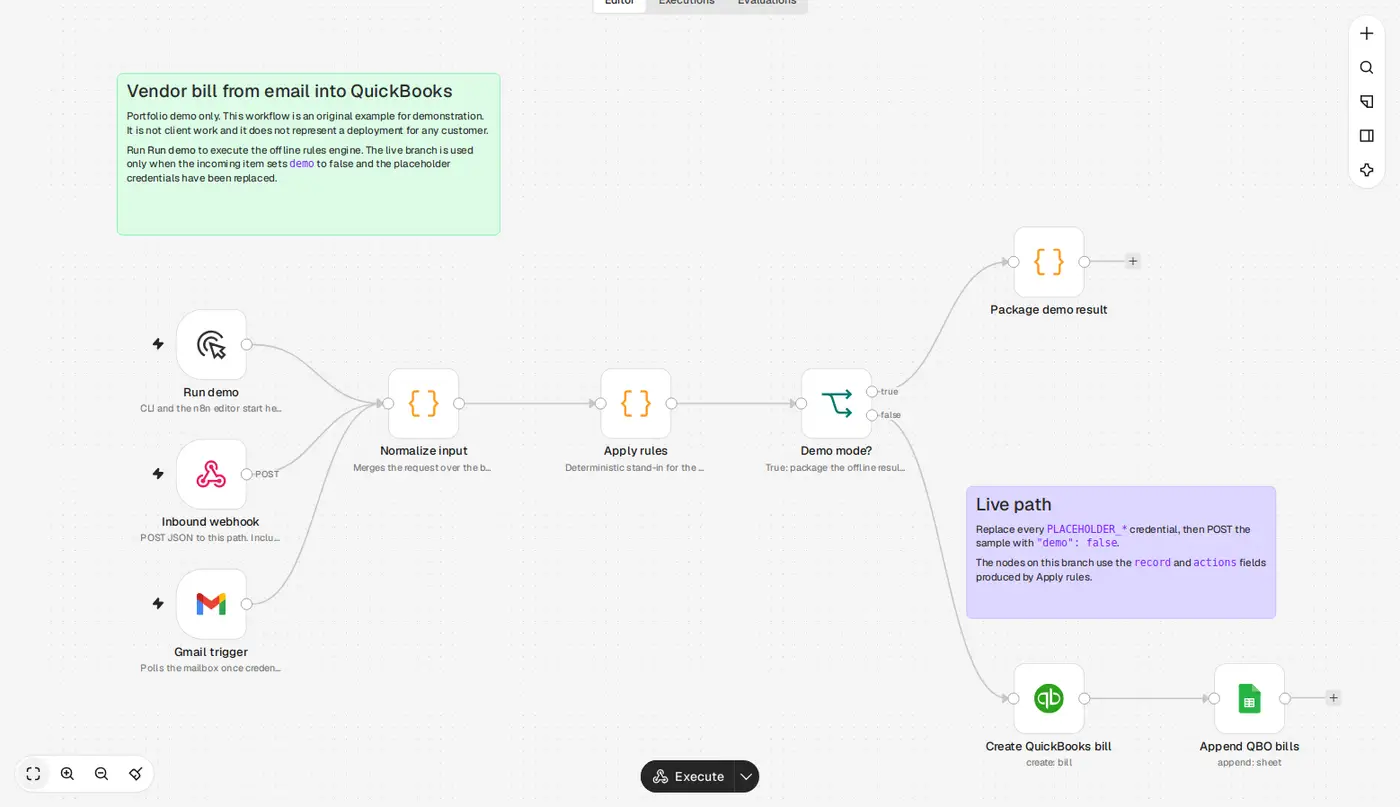
Step inspector
The first step shows the checked-in sample payload.Later steps name the node. They are not a live execution.
Guardrails
- Demo mode?
Credential ids in the JSON are placeholders. These files are portfolio demos.
Deploy this for your business
Tell us this slug and what still happens by hand. We will map it onto your accounts. This page is not a claim that the blueprint already runs for a customer.
README
Portfolio demo only. This workflow is an original example for demonstration. It is not client work and it does not represent a deployment for any customer.
| Category | invoices-docs |
| Difficulty | intermediate |
| Apps | Gmail, QuickBooks, Google Sheets |
| Time saved | About 5 minutes per bill |
| Demo status | Run Run demo in n8n. The live apps stay on the false branch until you send demo: false. |
Problem
Bills are saved to a folder and entered in QuickBooks in a batch, days after the due date was visible.
Who it is for
Bookkeepers whose clients live in QuickBooks Online.
What the workflow does
A vendor email becomes a balanced QuickBooks bill and a sheet row. Unbalanced extractions stay on the review route.
The checked-in sample is the contract. Apply rules turns that payload into a summary, a route, a record for the destination apps, and an actions list describing each write the live branch would make. Package demo result returns that object when demo is true, which is the default.
Estimated time saved
About 5 minutes per bill. The figure assumes the sample's volume and a person who currently does the same triage by hand. It is a planning number for a portfolio review, not a measured client result.
Node by node
- Overview. Sticky note with the portfolio-demo disclaimer and how to run the offline path.
- Run demo. Manual trigger used by the editor and by
n8n execute. With no payload, the next node loads the sample. - Inbound webhook. Production-style POST webhook at
/webhook/vendor-bill-to-quickbooks. Responds with the last node's JSON. - Gmail trigger. Gmail trigger for new mail. Swap the query filter in the node for the mailbox you actually use.
- Normalize input. Fills any missing fields from the checked-in sample and forces an explicit demo flag. An empty manual run therefore always has something valid to score.
- Apply rules. Posts only when the extracted parts balance. The review route is the signal to open the PDF.
- Demo mode?. Routes to the offline result while
demois true. The live apps run only when a caller sends demo:false. - Package demo result. Shapes the object returned to the editor, the CLI, and the webhook: summary, route, record, and the actions the live branch would have taken.
- Create QuickBooks bill. Creates a QuickBooks bill.
- Append QBO bills. Appends the record to the QBO bills tab. Map columns explicitly once the sheet exists.
Diagram
flowchart LR
  n0["Run demo"]
  n1["Inbound webhook"]
  n2["Gmail trigger"]
  n3["Normalize input"]
  n4["Apply rules"]
  n5["Demo mode?"]
  n6["Package demo result"]
  n7["Create QuickBooks bill"]
  n8["Append QBO bills"]
  n0 --> n3
  n1 --> n3
  n2 --> n3
  n3 --> n4
  n4 --> n5
  n5 -->|demo| n6
  n5 -->|live| n7
  n7 --> n8
Sample input
Save as the webhook body, or rely on the manual trigger, which loads the same object from Normalize input.
{
  "demo": true,
  "from": "ap@northwind.example",
  "filename": "northwind-inv-2041.pdf",
  "vendor": "Northwind Supplies",
  "invoiceNumber": "INV-2041",
  "currency": "USD",
  "subtotal": 1100,
  "tax": 88,
  "total": 1188,
  "dueDate": "2026-12-15",
  "text": "Vendor: Northwind Supplies\nInvoice INV-2041\nSubtotal 1100.00\nTax 88.00\nTotal 1188.00\nDue 2026-12-15\n"
}
The file next to this README, sample-input.json, is the same payload.
Setup
- Import
workflow.jsonwith n8n's Import from File. The workflow arrives inactive. - Select Run demo and execute it. Package demo result returns
status: demo_readyplus the summary, route, record, and actions. - Create each credential listed below in n8n and choose it on the matching node. The
PLACEHOLDER_*ids are labels, not secrets. - Replace every
YOUR_*resource id (sheet, channel, list, parent page, calendar) with a resource you own. - Optional HTTP check: POST
sample-input.jsonto/webhook/vendor-bill-to-quickbookswhile the workflow is published. The defaultdemo: trueflag stays on the offline path. - Connect the live apps, send the same JSON with
"demo": false, confirm one real record, then publish.
Credentials
- Gmail account (
gmailOAuth2), placeholder idPLACEHOLDER_GMAILOAUTH2 - QuickBooks account (
quickBooksOAuth2Api), placeholder idPLACEHOLDER_QUICKBOOKSOAUTH2API - Google Sheets account (
googleSheetsOAuth2Api), placeholder idPLACEHOLDER_GOOGLESHEETSOAUTH2API
Placeholder ids are not real credentials. n8n will show them as missing until you create a credential of that type and select it on the node. Do not paste production secrets into the workflow JSON.
Customization
- Match the vendor to a QuickBooks vendor id before create. The demo carries the vendor name.
- Route unbalanced invoices to a review tab and only post the ones whose subtotal, tax, and total agree.
- Store the source filename and message id on the row so a bookkeeper can open the original PDF.
Demo mode and the live branch
- Execute Run demo or POST the sample to
/webhook/vendor-bill-to-quickbookswithdemoomitted or true. The run stops after Package demo result. - POST the same JSON with
"demo": falseonly after every placeholder credential on the live branch has been replaced. - The rules engine is intentionally local so the workflow can be reviewed and tested without buying model or SaaS credits. When you want a live model, put it on the live branch in front of the app nodes, or replace Apply rules with an Information Extractor / AI Agent and keep the same output shape.
Portfolio note
Built as a portfolio demo for Mustafa (mustafaautomation). Public demos live under *.quvantic.com. Vendor names belong to their owners. Nothing in this folder is a customer deliverable.