ZapierChecked blueprint7 nodes
Draft a QuickBooks bill from an invoice email
Match the sender to a QuickBooks vendor and create the bill only when the vendor exists and the total parsed cleanly.
Portfolio reference build with demo data and placeholder credentials, not a client deployment.
Pain
Stops opening PDFs, typing vendor totals, and hoping nobody pays the same bill twice.
Solution
Match the sender to a QuickBooks vendor and create the bill only when the vendor exists and the total parsed cleanly.
Impact · From the blueprint
About 4 minutes per bill, and no duplicate vendors to merge at year end.
- Intermediate
- Validated
- Draft / approval
- Gmail
- AI by Zapier
- Code by Zapier
- QuickBooks Online
- Filter by Zapier
Library status: passing. Schema, field mapping, task count, and Code-step unit tests pass. Not built in a live Zapier account.
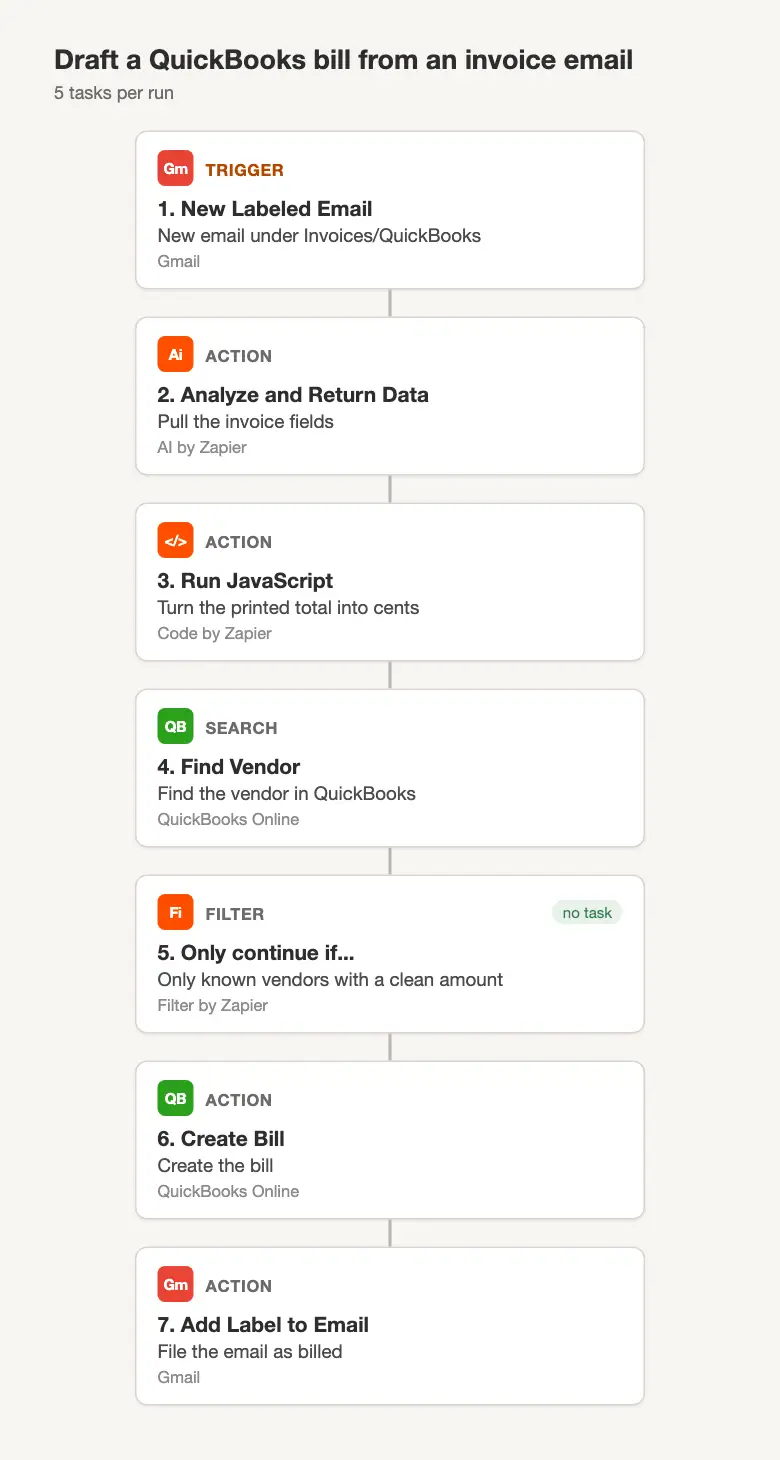
Step inspector
The first step shows the checked-in sample payload.Later steps name the node. They are not a live execution.
Guardrails
- Filter by Zapier · Only continue if...
Credential ids in the JSON are placeholders. These files are portfolio demos.
Deploy this for your business
Tell us this slug and what still happens by hand. We will map it onto your accounts. This page is not a claim that the blueprint already runs for a customer.
README
Portfolio demo by Mustafa (mustafaautomation). Not client work. The people, companies, and numbers in it are made up. Rebuild it in your own Zapier account. Nothing here is connected to anyone's account.
Category: Invoices and documents
Difficulty: intermediate
Apps: Gmail, AI by Zapier, Code by Zapier, QuickBooks Online, Filter by Zapier
Zapier plan: Professional (multi-step Zap: 6 steps after the trigger; Filter by Zapier; AI by Zapier; premium app: QuickBooks Online)
Tasks per run: 5
Test status: passing (schema, mapping scope, task count, Code step unit tests)
Problem
QuickBooks Online bills are keyed in from emailed invoices, often days later. A new vendor typed slightly differently creates a duplicate vendor record that the accountant has to merge at year end.
Who it's for
Small businesses and bookkeepers on QuickBooks Online who want emailed invoices to become bills without creating stray vendors.
How the Zap runs
flowchart TD
  s1["1. Gmail: New Labeled Email<br/>New email under Invoices/QuickBooks"]
  s2["2. AI by Zapier<br/>Pull the invoice fields"]
  s1 --> s2
  s3["3. Code by Zapier<br/>Turn the printed total into cents"]
  s2 --> s3
  s4["4. QuickBooks Online<br/>Find the vendor in QuickBooks"]
  s3 --> s4
  s5{{"5. Filter by Zapier<br/>Only known vendors with a clean amount"}}
  s4 --> s5
  s6["6. QuickBooks Online<br/>Create the bill"]
  s5 -->|"passes"| s6
  s7["7. Gmail<br/>File the email as billed"]
  s6 --> s7
Build it in the Zapier editor
Zapier has no import file for a Zap like this one, so it is built by hand from the steps below. zap.json is the same Zap in a machine-readable form (schema), and zap.yaml is the same document in YAML.
A value like [2. vendor] means: click the field, open step 2 in the data picker, and choose vendor. Plain text is typed as shown. YOUR_... is a value from your own account.
Before you start
- Have these ready from your own accounts:
YOUR_EXPENSE_ACCOUNT.
Steps
1. Trigger: New email under Invoices/QuickBooks
App: Gmail · Event: New Labeled Email · polling (Zapier checks on your plan's update interval) · Tasks: 0
Fires for each email under the Invoices/QuickBooks label.
| Field | Value |
|---|---|
| Label | Invoices/QuickBooks |
Fields this library maps from the trigger: message_id, thread_id, from_email, from_name, to, subject, date, body_plain, snippet, labels, attachment_count, attachment_names. Zapier shows them with its own labels; pick the one with the same meaning.
2. Action: Pull the invoice fields
App: AI by Zapier · Event: Analyze and Return Data · Tasks: 1
Same extraction prompt as the other invoice templates.
| Field | Value |
|---|---|
| Model | Default (fast) |
| Instructions | You read supplier invoices for an accounts-payable team. From the email below, return: vendor (the company that sent the invoice), invoice_number (exactly as printed), invoice_date and due_date (YYYY-MM-DD, empty if not stated), total_text (the grand total exactly as printed, with its currency symbol or code, for example "$1,280.00" or "1.280,00 EUR"), currency (ISO code if you can tell, otherwise empty), line_summary (one short line describing what was bought), and text_found ("yes" if the email text actually contains the invoice figures, "no" if the figures are only inside an attachment you cannot read). Never invent a number. If a value is not in the text, leave it empty. |
| Input data | From: [1. from_name] <[1. from_email]> Subject: [1. subject] [1. body_plain] |
| Output fields | vendor, invoice_number, invoice_date, due_date, total_text, currency, line_summary, text_found |
Later steps can map: vendor, invoice_number, invoice_date, due_date, total_text, currency, line_summary, text_found.
3. Action: Turn the printed total into cents
App: Code by Zapier · Event: Run JavaScript · Tasks: 1
Gives QuickBooks a plain decimal amount and flags anything ambiguous.
Paste the whole of code/parse-money.js into the code box. Source: content/code/parse-money.cjs. Unit tests: content/code/parse-money.test.cjs.
| Input Data key | Value |
|---|---|
amount_text | [2. total_text] |
currency_hint | [2. currency] |
Returns: amount, amount_fixed, amount_cents, currency, format, needs_review.
4. Search: Find the vendor in QuickBooks
App: QuickBooks Online · Event: Find Vendor · Tasks: 1
Searches by display name. The Zap never creates vendors, so an unknown sender cannot add a near-duplicate vendor record.
| Field | Value |
|---|---|
| Display Name | [2. vendor] |
| Should this step be considered a "success" when nothing is found? | Yes |
Later steps can map: id, display_name, _zap_search_was_found_status.
5. Filter: Only known vendors with a clean amount
App: Filter by Zapier · Event: Only continue if... · Tasks: 0
Unknown vendors and ambiguous totals stop here and stay under the label for a person.
Only continue if: [4. _zap_search_was_found_status] (Boolean) Is true and [3. needs_review] (Boolean) Is false and [2. text_found] (Text) Exactly matches yes.
Most runs pass this filter.
6. Action: Create the bill
App: QuickBooks Online · Event: Create Bill · Tasks: 1
Creates the bill against the vendor id found above, with one expense line for the total.
| Field | Value |
|---|---|
| Vendor | [4. id] |
| Bill Date | [2. invoice_date] |
| Due Date | [2. due_date] |
| Ref Number | [2. invoice_number] |
| Line Item: Account | YOUR_EXPENSE_ACCOUNT |
| Line Item: Amount | [3. amount_fixed] |
| Line Item: Description | [2. line_summary] |
| Memo | From email: [1. subject] |
Later steps can map: id, doc_number.
7. Action: File the email as billed
App: Gmail · Event: Add Label to Email · Tasks: 1
Moves the email to Invoices/Billed so the working label only holds invoices still to handle.
| Field | Value |
|---|---|
| Message | [1. message_id] |
| Labels | Invoices/Billed |
Later steps can map: id.
Test it
Use sample-trigger.json as the test record. For an instant or webhook trigger, send it to the trigger once; for a polling trigger, create a matching record in the app and click Test trigger. Then test each step in order and read its output before you turn the Zap on.
{
  "message_id": "18c2f4a9b7d01e55",
  "thread_id": "18c2f4a9b7d01e55",
  "from_email": "accounts@harbor-goods.example",
  "from_name": "Harbor Goods Accounts",
  "to": "ap@northwind-studio.example",
  "subject": "Invoice INV-001842 from Harbor Goods",
  "date": "2026-11-24T09:14:03Z",
  "body_plain": "Hello Northwind Studio team,\n\nPlease find invoice INV-001842 for the November studio supplies order.\n\nInvoice date: 2026-11-21\nDue date: 2026-12-21\nItems: 40 x linen aprons, 25 x stoneware mugs\nTotal due: $1,280.00\n\nBank details are on the attached PDF.\nThanks,\nHarbor Goods Accounts",
  "snippet": "Please find invoice INV-001842 for the November studio supplies order.",
  "labels": "INBOX, Invoices/QuickBooks",
  "attachment_count": 1,
  "attachment_names": "INV-001842.pdf"
}
Plan and task usage
| Step | App | Tasks |
|---|---|---|
| 1. New email under Invoices/QuickBooks | Gmail | 0 |
| 2. Pull the invoice fields | AI by Zapier | 1 |
| 3. Turn the printed total into cents | Code by Zapier | 1 |
| 4. Find the vendor in QuickBooks | QuickBooks Online | 1 |
| 5. Only known vendors with a clean amount | Filter by Zapier | 0 |
| 6. Create the bill | QuickBooks Online | 1 |
| 7. File the email as billed | Gmail | 1 |
A typical run uses 5 tasks. Zapier does not charge tasks for triggers, Filter, Paths, Formatter, Delay, Looping, Digest, Storage, or Zapier Tables steps. AI by Zapier is counted here as 1 task; Zapier prices it by model tier, so a larger model can cost more.
Minimum plan: Professional, because of: multi-step Zap: 6 steps after the trigger; Filter by Zapier; AI by Zapier; premium app: QuickBooks Online. The Free plan only runs two-step Zaps (a trigger and one action) and leaves out Filters, Paths, Formatter, webhooks, AI by Zapier, and premium apps.
Customize
- If your vendors sign emails differently from their QuickBooks display name, add a Formatter Utilities → Lookup Table step that maps sender email to vendor name, and search on that instead.
- Add a Slack step after the filter is blocked by turning the filter into Paths, if you want unknown vendors announced instead of left under the label.
- Set
YOUR_EXPENSE_ACCOUNTper vendor with a lookup table if suppliers map to different expense accounts.
Limits
- QuickBooks Online is a premium app on Zapier.
- Multi-currency bills need multi-currency switched on in QuickBooks; otherwise the amount is booked in the home currency.
Time saved
About 4 minutes per bill, and no duplicate vendors to merge at year end.
Files
| File | What it is |
|---|---|
zap.json | The Zap, step by step, in schema 1.0.0. |
zap.yaml | The same document in YAML. |
sample-trigger.json | Fictional trigger record for the first test. |
diagram.png | The step list, drawn like the Zapier editor. |
code/parse-money.js | Paste-ready Code by Zapier step. |