ZapierChecked blueprint4 nodes
Draft a lead reply with CRM and sheet tools
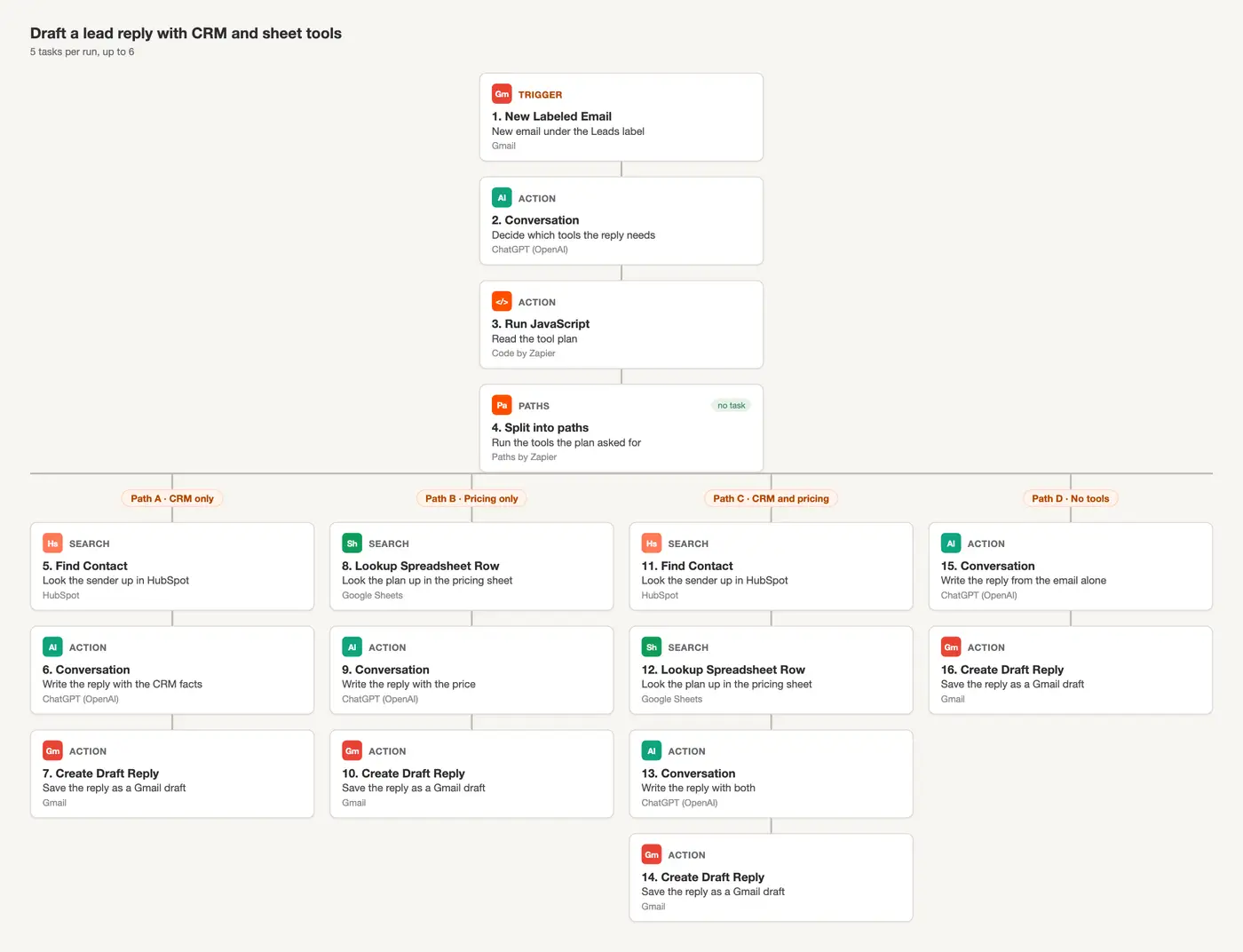
A model reads a lead email, decides whether it needs the CRM record, the pricing sheet, both, or neither, and drafts a reply from what those lookups return.
Portfolio reference build with demo data and placeholder credentials, not a client deployment.
Pain
Replaces a brittle if/then chain with an assistant that can look something up, then stops before a sensitive send.
Solution
A model reads a lead email, decides whether it needs the CRM record, the pricing sheet, both, or neither, and drafts a reply from what those lookups return.
Impact · From the blueprint
About 6 to 8 minutes per lead reply (two lookups and a first draft), and quoted prices always come from the current sheet.
- Advanced
- Validated
- Draft / approval
- Gmail
- ChatGPT (OpenAI)
- Code by Zapier
- Paths by Zapier
- HubSpot
- Google Sheets
Library status: passing. Schema, field mapping, task count, and Code-step unit tests pass. Not built in a live Zapier account.
Step inspector
The first step shows the checked-in sample payload.Later steps name the node. They are not a live execution.
Guardrails
- Draft or approval gate described in the README
Credential ids in the JSON are placeholders. These files are portfolio demos.
Deploy this for your business
Tell us this slug and what still happens by hand. We will map it onto your accounts. This page is not a claim that the blueprint already runs for a customer.
README
Portfolio demo by Mustafa (mustafaautomation). Not client work. The people, companies, and numbers in it are made up. Rebuild it in your own Zapier account. Nothing here is connected to anyone's account.
Category: AI agents
Difficulty: advanced
Apps: Gmail, ChatGPT (OpenAI), Code by Zapier, Paths by Zapier, HubSpot, Google Sheets
Zapier plan: Professional (multi-step Zap: 15 steps after the trigger; Paths by Zapier)
Tasks per run: 5 typical, 6 at most
Test status: passing (schema, mapping scope, task count, Code step unit tests)
Problem
Replying to a lead well means checking two places first: the CRM (have we spoken before, which plan were they on) and the pricing sheet. Under time pressure people skip both, quote last year's price, or reply as if a returning client were a stranger.
Who it's for
Small agencies and service businesses whose inbound leads ask about price and past work, and who want a fast first draft without letting a model send anything on its own.
How the Zap runs
flowchart TD
  s1["1. Gmail: New Labeled Email<br/>New email under the Leads label"]
  s2["2. ChatGPT (OpenAI)<br/>Decide which tools the reply needs"]
  s1 --> s2
  s3["3. Code by Zapier<br/>Read the tool plan"]
  s2 --> s3
  s4{"4. Paths by Zapier<br/>Run the tools the plan asked for"}
  s3 --> s4
  s5["5. HubSpot<br/>Look the sender up in HubSpot"]
  s4 -->|"CRM only"| s5
  s6["6. ChatGPT (OpenAI)<br/>Write the reply with the CRM facts"]
  s5 --> s6
  s7["7. Gmail<br/>Save the reply as a Gmail draft"]
  s6 --> s7
  s8["8. Google Sheets<br/>Look the plan up in the pricing sheet"]
  s4 -->|"Pricing only"| s8
  s9["9. ChatGPT (OpenAI)<br/>Write the reply with the price"]
  s8 --> s9
  s10["10. Gmail<br/>Save the reply as a Gmail draft"]
  s9 --> s10
  s11["11. HubSpot<br/>Look the sender up in HubSpot"]
  s4 -->|"CRM and pricing"| s11
  s12["12. Google Sheets<br/>Look the plan up in the pricing sheet"]
  s11 --> s12
  s13["13. ChatGPT (OpenAI)<br/>Write the reply with both"]
  s12 --> s13
  s14["14. Gmail<br/>Save the reply as a Gmail draft"]
  s13 --> s14
  s15["15. ChatGPT (OpenAI)<br/>Write the reply from the email alone"]
  s4 -->|"No tools"| s15
  s16["16. Gmail<br/>Save the reply as a Gmail draft"]
  s15 --> s16
Build it in the Zapier editor
Zapier has no import file for a Zap like this one, so it is built by hand from the steps below. zap.json is the same Zap in a machine-readable form (schema), and zap.yaml is the same document in YAML.
A value like [2. vendor] means: click the field, open step 2 in the data picker, and choose vendor. Plain text is typed as shown. YOUR_... is a value from your own account.
Before you start
- Create the sheet Sales › Pricing with these headers in row 1:
plan_name. - Create the pricing sheet Sales › Pricing with one row per plan;
plan_namemust hold the exact names the planning prompt lists (Starter, Growth, Scale). - Add a
last_notecontact property in HubSpot, or map another property you keep conversation notes in.
Steps
1. Trigger: New email under the Leads label
App: Gmail · Event: New Labeled Email · polling (Zapier checks on your plan's update interval) · Tasks: 0
Fires for each email under the Leads label, which a Gmail filter on your contact-form address can apply.
| Field | Value |
|---|---|
| Label | Leads |
Fields this library maps from the trigger: message_id, thread_id, from_email, from_name, to, subject, date, body_plain, snippet, labels, attachment_count, attachment_names. Zapier shows them with its own labels; pick the one with the same meaning.
2. Action: Decide which tools the reply needs
App: ChatGPT (OpenAI) · Event: Conversation · Tasks: 1
The model only plans. It returns JSON naming the lookups it wants and what to search for. The tools are ordinary Zapier search steps below; the model never calls an API or sends an email itself.
| Field | Value |
|---|---|
| User Message | From: [1. from_name] <[1. from_email]> Subject: [1. subject] [1. body_plain] |
| Assistant Instructions | You plan lookups for a sales assistant. Tools: crm_lookup (find the sender in HubSpot by email: past conversations, lifecycle stage, company) and sheet_lookup (find one plan in the pricing sheet by its exact plan name: Starter, Growth, or Scale). Reply with JSON only, no prose: {"tools": [...], "crm_query": "...", "sheet_query": "..."}. Use crm_lookup when the sender mentions earlier work or might be an existing client. Use sheet_lookup when they ask about price, plans, or what is included. Use an empty list when neither helps. |
| Model | gpt-4o-mini |
| Memory Key | (leave blank) |
Later steps can map: response.
3. Action: Read the tool plan
App: Code by Zapier · Event: Run JavaScript · Tasks: 1
Strips code fences, drops tools that are not on the allow list, and returns one plan value (crm, sheet, both, none). A malformed plan becomes "none" instead of an error.
Paste the whole of code/parse-tool-call.js into the code box. Source: content/code/parse-tool-call.cjs. Unit tests: content/code/parse-tool-call.test.cjs.
| Input Data key | Value |
|---|---|
model_text | [2. response] |
allowed_tools | crm_lookup,sheet_lookup |
Returns: plan, wants_crm, wants_sheet, crm_query, sheet_query, tool_count, valid_json, error.
4. Paths: Run the tools the plan asked for
App: Paths by Zapier · Event: Split into paths · Tasks: 0
One path per plan value. Each path runs its lookups, then asks for the reply with only those facts in front of the model.
The path rules exclude each other, so at most one path runs. Nothing can follow a Paths step, so each path ends the run on its own.
Path A: CRM only. Rule: [3. plan] (Text) Exactly matches crm. This is the usual path.
5. Search: Look the sender up in HubSpot (path A)
App: HubSpot · Event: Find Contact · Tasks: 1
Searches by the email the plan named, normally the sender's.
| Field | Value |
|---|---|
| Field to search by | |
| Search value | [3. crm_query] |
| Should this step be considered a "success" when nothing is found? | Yes |
Later steps can map: id, firstname, company, lifecyclestage, hs_lead_status, last_note, _zap_search_was_found_status.
6. Action: Write the reply with the CRM facts (path A)
App: ChatGPT (OpenAI) · Event: Conversation · Tasks: 1
Gets the email plus the CRM record, nothing else.
| Field | Value |
|---|---|
| User Message | EMAIL from [1. from_name]: [1. body_plain] CRM (found: [5. _zap_search_was_found_status]): name [5. firstname], company [5. company], stage [5. lifecyclestage], last note: [5. last_note] PRICING: not looked up |
| Assistant Instructions | You write first replies to sales inquiries for Northwind Studio, a small automation agency. Be warm, specific, and short (under 140 words). Use only the facts given under CRM and PRICING. If a fact you need is missing, say a person will confirm it; never invent prices, dates, or past conversations. End with one clear next step. Write plain text, no subject line, no signature. |
| Model | gpt-4o-mini |
| Memory Key | (leave blank) |
Later steps can map: response.
7. Action: Save the reply as a Gmail draft (path A)
App: Gmail · Event: Create Draft Reply · Tasks: 1
A draft in the same thread, never a sent email. A person reads, edits, and sends it.
| Field | Value |
|---|---|
| Thread | [1. thread_id] |
| To | [1. from_email] |
| Body Type | plain |
| Body | [6. response] |
Later steps can map: id.
Path B: Pricing only. Rule: [3. plan] (Text) Exactly matches sheet.
8. Search: Look the plan up in the pricing sheet (path B)
App: Google Sheets · Event: Lookup Spreadsheet Row · Tasks: 1
Finds the row for the plan the model named. The sheet, not the model, is the source of every number.
| Field | Value |
|---|---|
| Drive | My Google Drive |
| Spreadsheet | Sales |
| Worksheet | Pricing |
| Lookup Column | plan_name |
| Lookup Value | [3. sheet_query] |
| Should this step be considered a "success" when nothing is found? | Yes |
Later steps can map: row_number, _zap_search_was_found_status, plan_name, monthly_price, annual_price, included, setup_fee.
9. Action: Write the reply with the price (path B)
App: ChatGPT (OpenAI) · Event: Conversation · Tasks: 1
Gets the email plus one pricing row.
| Field | Value |
|---|---|
| User Message | EMAIL from [1. from_name]: [1. body_plain] CRM: not looked up PRICING (found: [8. _zap_search_was_found_status]): [8. plan_name] at [8. monthly_price] a month or [8. annual_price] a year, setup [8. setup_fee]. Included: [8. included] |
| Assistant Instructions | You write first replies to sales inquiries for Northwind Studio, a small automation agency. Be warm, specific, and short (under 140 words). Use only the facts given under CRM and PRICING. If a fact you need is missing, say a person will confirm it; never invent prices, dates, or past conversations. End with one clear next step. Write plain text, no subject line, no signature. |
| Model | gpt-4o-mini |
| Memory Key | (leave blank) |
Later steps can map: response.
10. Action: Save the reply as a Gmail draft (path B)
App: Gmail · Event: Create Draft Reply · Tasks: 1
A draft in the same thread, never a sent email. A person reads, edits, and sends it.
| Field | Value |
|---|---|
| Thread | [1. thread_id] |
| To | [1. from_email] |
| Body Type | plain |
| Body | [9. response] |
Later steps can map: id.
Path C: CRM and pricing. Rule: [3. plan] (Text) Exactly matches both.
11. Search: Look the sender up in HubSpot (path C)
App: HubSpot · Event: Find Contact · Tasks: 1
Same CRM lookup as the first path.
| Field | Value |
|---|---|
| Field to search by | |
| Search value | [3. crm_query] |
| Should this step be considered a "success" when nothing is found? | Yes |
Later steps can map: id, firstname, company, lifecyclestage, hs_lead_status, last_note, _zap_search_was_found_status.
12. Search: Look the plan up in the pricing sheet (path C)
App: Google Sheets · Event: Lookup Spreadsheet Row · Tasks: 1
Same pricing lookup as the second path.
| Field | Value |
|---|---|
| Drive | My Google Drive |
| Spreadsheet | Sales |
| Worksheet | Pricing |
| Lookup Column | plan_name |
| Lookup Value | [3. sheet_query] |
| Should this step be considered a "success" when nothing is found? | Yes |
Later steps can map: row_number, _zap_search_was_found_status, plan_name, monthly_price, annual_price, included, setup_fee.
13. Action: Write the reply with both (path C)
App: ChatGPT (OpenAI) · Event: Conversation · Tasks: 1
Gets the email, the CRM record, and the pricing row.
| Field | Value |
|---|---|
| User Message | EMAIL from [1. from_name]: [1. body_plain] CRM (found: [11. _zap_search_was_found_status]): name [11. firstname], company [11. company], stage [11. lifecyclestage], last note: [11. last_note] PRICING (found: [12. _zap_search_was_found_status]): [12. plan_name] at [12. monthly_price] a month or [12. annual_price] a year, setup [12. setup_fee]. Included: [12. included] |
| Assistant Instructions | You write first replies to sales inquiries for Northwind Studio, a small automation agency. Be warm, specific, and short (under 140 words). Use only the facts given under CRM and PRICING. If a fact you need is missing, say a person will confirm it; never invent prices, dates, or past conversations. End with one clear next step. Write plain text, no subject line, no signature. |
| Model | gpt-4o-mini |
| Memory Key | (leave blank) |
Later steps can map: response.
14. Action: Save the reply as a Gmail draft (path C)
App: Gmail · Event: Create Draft Reply · Tasks: 1
A draft in the same thread, never a sent email. A person reads, edits, and sends it.
| Field | Value |
|---|---|
| Thread | [1. thread_id] |
| To | [1. from_email] |
| Body Type | plain |
| Body | [13. response] |
Later steps can map: id.
Path D: No tools. Rule: [3. plan] (Text) Exactly matches none.
15. Action: Write the reply from the email alone (path D)
App: ChatGPT (OpenAI) · Event: Conversation · Tasks: 1
For greetings, scheduling questions, and anything neither tool helps with.
| Field | Value |
|---|---|
| User Message | EMAIL from [1. from_name]: [1. body_plain] CRM: not looked up PRICING: not looked up |
| Assistant Instructions | You write first replies to sales inquiries for Northwind Studio, a small automation agency. Be warm, specific, and short (under 140 words). Use only the facts given under CRM and PRICING. If a fact you need is missing, say a person will confirm it; never invent prices, dates, or past conversations. End with one clear next step. Write plain text, no subject line, no signature. |
| Model | gpt-4o-mini |
| Memory Key | (leave blank) |
Later steps can map: response.
16. Action: Save the reply as a Gmail draft (path D)
App: Gmail · Event: Create Draft Reply · Tasks: 1
A draft in the same thread, never a sent email. A person reads, edits, and sends it.
| Field | Value |
|---|---|
| Thread | [1. thread_id] |
| To | [1. from_email] |
| Body Type | plain |
| Body | [15. response] |
Later steps can map: id.
Test it
Use sample-trigger.json as the test record. For an instant or webhook trigger, send it to the trigger once; for a polling trigger, create a matching record in the app and click Test trigger. Then test each step in order and read its output before you turn the Zap on.
{
  "message_id": "18c2f4a9b7d01e55",
  "thread_id": "18c2f4a9b7d01e55",
  "from_email": "dana@northwind-studio.example",
  "from_name": "Dana Okafor",
  "to": "hello@quillfield-agency.example",
  "subject": "Back for round two - Growth plan?",
  "date": "2026-11-24T09:14:03Z",
  "body_plain": "Hi again,\n\nYou set up our lead routing last spring and it has been great. We now want the same for our second location. What does the Growth plan cost these days, and is setup included?\n\nDana",
  "snippet": "You set up our lead routing last spring and it has been great.",
  "labels": "INBOX, Leads",
  "attachment_count": 0,
  "attachment_names": ""
}
Plan and task usage
| Step | App | Tasks |
|---|---|---|
| 1. New email under the Leads label | Gmail | 0 |
| 2. Decide which tools the reply needs | ChatGPT (OpenAI) | 1 |
| 3. Read the tool plan | Code by Zapier | 1 |
| 4. Run the tools the plan asked for | Paths by Zapier | 0 |
| 5. Look the sender up in HubSpot | HubSpot | 1 |
| 6. Write the reply with the CRM facts | ChatGPT (OpenAI) | 1 |
| 7. Save the reply as a Gmail draft | Gmail | 1 |
| 8. Look the plan up in the pricing sheet | Google Sheets | 1 |
| 9. Write the reply with the price | ChatGPT (OpenAI) | 1 |
| 10. Save the reply as a Gmail draft | Gmail | 1 |
| 11. Look the sender up in HubSpot | HubSpot | 1 |
| 12. Look the plan up in the pricing sheet | Google Sheets | 1 |
| 13. Write the reply with both | ChatGPT (OpenAI) | 1 |
| 14. Save the reply as a Gmail draft | Gmail | 1 |
| 15. Write the reply from the email alone | ChatGPT (OpenAI) | 1 |
| 16. Save the reply as a Gmail draft | Gmail | 1 |
A typical run uses 5 tasks; the upper bound is 6, when every filter passes and the costliest paths run. Zapier does not charge tasks for triggers, Filter, Paths, Formatter, Delay, Looping, Digest, Storage, or Zapier Tables steps. AI by Zapier is counted here as 1 task; Zapier prices it by model tier, so a larger model can cost more.
Minimum plan: Professional, because of: multi-step Zap: 15 steps after the trigger; Paths by Zapier. The Free plan only runs two-step Zaps (a trigger and one action) and leaves out Filters, Paths, Formatter, webhooks, AI by Zapier, and premium apps.
Customize
- Add a third tool (for example a Calendly link lookup) by adding it to the planning prompt, the
allowed_toolslist, and a path. - Swap ChatGPT for AI by Zapier or Claude; keep the plan step's output as JSON and nothing else.
- Change the answer instructions to your own tone and sign-off rules; keep the "never invent prices" line.
Limits
- The model can still misread an email. That is why the Zap only drafts: nothing reaches the lead until a person presses send.
- ChatGPT steps use your own OpenAI API key and are billed by OpenAI on top of the Zapier task.
Time saved
About 6 to 8 minutes per lead reply (two lookups and a first draft), and quoted prices always come from the current sheet.
Files
| File | What it is |
|---|---|
zap.json | The Zap, step by step, in schema 1.0.0. |
zap.yaml | The same document in YAML. |
sample-trigger.json | Fictional trigger record for the first test. |
diagram.png | The step list, drawn like the Zapier editor. |
code/parse-tool-call.js | Paste-ready Code by Zapier step. |