ZapierChecked blueprint6 nodes
Score a form lead into Pipedrive
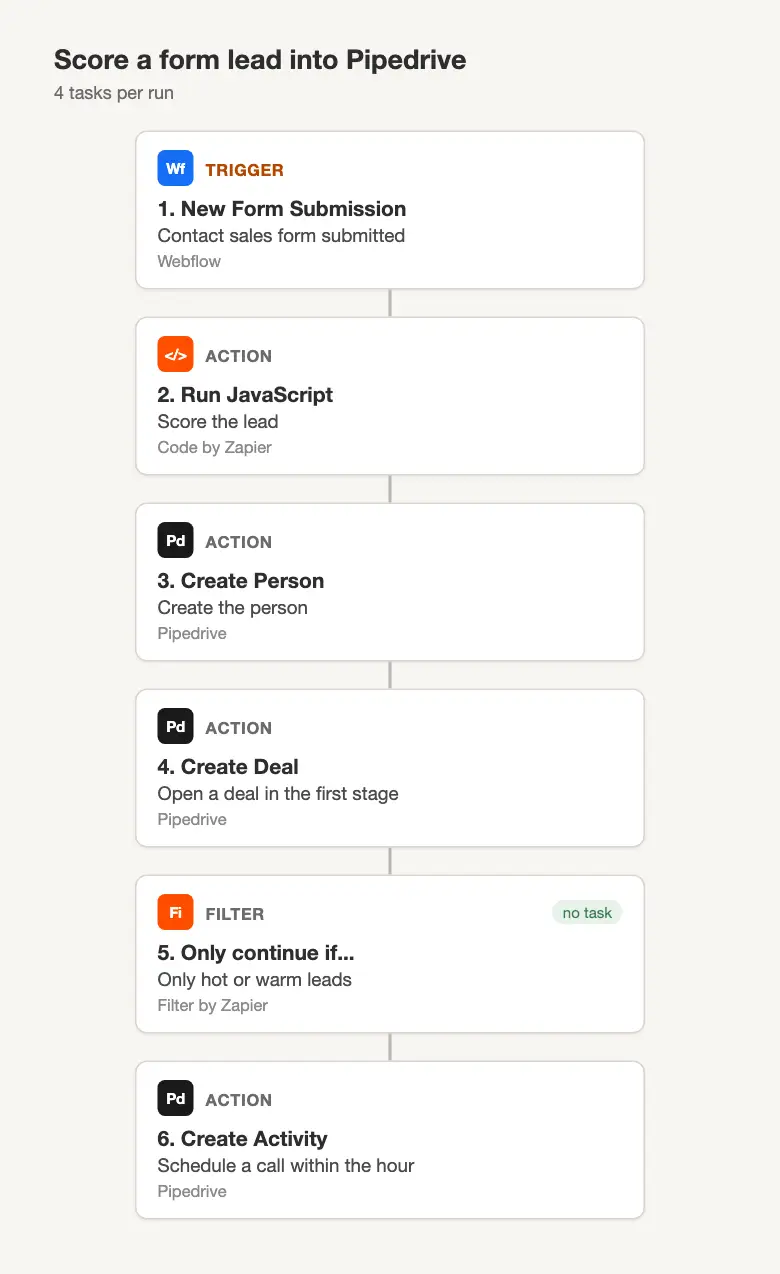
Score a Webflow enquiry, create the Pipedrive person and deal, and schedule a call within the hour for hot and warm leads.
Portfolio reference build with demo data and placeholder credentials, not a client deployment.
Pain
Stops reps from manually copying web forms, guessing lead quality, and researching prospects before calling. Bad fits get filtered; hot buyers land with a full brief.
Solution
Score a Webflow enquiry, create the Pipedrive person and deal, and schedule a call within the hour for hot and warm leads.
Impact · From the blueprint
About 4 minutes per lead, and every hot or warm lead has a call on someone's list before the hour is out.
- Intermediate
- Validated
- Auto path
- Webflow
- Code by Zapier
- Pipedrive
- Filter by Zapier
Library status: passing. Schema, field mapping, task count, and Code-step unit tests pass. Not built in a live Zapier account.
Step inspector
The first step shows the checked-in sample payload.Later steps name the node. They are not a live execution.
Guardrails
- Filter by Zapier · Only continue if...
Credential ids in the JSON are placeholders. These files are portfolio demos.
Deploy this for your business
Tell us this slug and what still happens by hand. We will map it onto your accounts. This page is not a claim that the blueprint already runs for a customer.
README
Portfolio demo by Mustafa (mustafaautomation). Not client work. The people, companies, and numbers in it are made up. Rebuild it in your own Zapier account. Nothing here is connected to anyone's account.
Category: Lead gen and CRM
Difficulty: intermediate
Apps: Webflow, Code by Zapier, Pipedrive, Filter by Zapier
Zapier plan: Professional (multi-step Zap: 5 steps after the trigger; Filter by Zapier)
Tasks per run: 4
Test status: passing (schema, mapping scope, task count, Code step unit tests)
Problem
Website enquiries reach Pipedrive as people without deals, so they never show up in the pipeline view the team works from. Nobody schedules the first call, and good leads go cold in an inbox.
Who it's for
Small sales teams on Pipedrive whose marketing site is built in Webflow.
How the Zap runs
flowchart TD
  s1["1. Webflow: New Form Submission<br/>Contact sales form submitted"]
  s2["2. Code by Zapier<br/>Score the lead"]
  s1 --> s2
  s3["3. Pipedrive<br/>Create the person"]
  s2 --> s3
  s4["4. Pipedrive<br/>Open a deal in the first stage"]
  s3 --> s4
  s5{{"5. Filter by Zapier<br/>Only hot or warm leads"}}
  s4 --> s5
  s6["6. Pipedrive<br/>Schedule a call within the hour"]
  s5 -->|"passes"| s6
Build it in the Zapier editor
Zapier has no import file for a Zap like this one, so it is built by hand from the steps below. zap.json is the same Zap in a machine-readable form (schema), and zap.yaml is the same document in YAML.
A value like [2. vendor] means: click the field, open step 2 in the data picker, and choose vendor. Plain text is typed as shown. YOUR_... is a value from your own account.
Before you start
- In Pipedrive, add the deal custom fields
Lead score(numerical) andScore reasons(large text). - Have these ready from your own accounts:
YOUR_PIPEDRIVE_USER,YOUR_WEBFLOW_SITE.
Steps
1. Trigger: Contact sales form submitted
App: Webflow · Event: New Form Submission · instant (the app pushes each event to Zapier) · Tasks: 0
Fires when the Contact sales form on your Webflow site is submitted.
| Field | Value |
|---|---|
| Site | YOUR_WEBFLOW_SITE |
| Form | Contact sales |
Fields this library maps from the trigger: submission_id, form_name, site_name, submitted_at, name, email, company, role, team_size, budget, timeline, message. Zapier shows them with its own labels; pick the one with the same meaning.
2. Action: Score the lead
App: Code by Zapier · Event: Run JavaScript · Tasks: 1
Scores work email, role, team size, budget, and timeline, and returns the reasons so the deal note explains itself.
Paste the whole of code/score-lead.js into the code box. Source: content/code/score-lead.cjs. Unit tests: content/code/score-lead.test.cjs.
| Input Data key | Value |
|---|---|
email | [1. email] |
company | [1. company] |
job_title | [1. role] |
company_size | [1. team_size] |
budget | [1. budget] |
timeline | [1. timeline] |
message | [1. message] |
Returns: score, tier, reasons, is_work_email.
3. Action: Create the person
App: Pipedrive · Event: Create Person · Tasks: 1
The person holds the contact details; the deal below links to it.
| Field | Value |
|---|---|
| Name | [1. name] |
| [1. email] | |
| Organization Name | [1. company] |
| Owner | YOUR_PIPEDRIVE_USER |
Later steps can map: id, name.
4. Action: Open a deal in the first stage
App: Pipedrive · Event: Create Deal · Tasks: 1
A deal puts the lead in the pipeline view, with the score and tier in the title so the board is sortable at a glance.
| Field | Value |
|---|---|
| Title | [1. company] ([2. tier], [2. score]) |
| Person | [3. id] |
| Pipeline | Sales |
| Stage | Lead in |
| Value | [1. budget] |
| Currency | USD |
| Lead score (custom field) | [2. score] |
| Score reasons (custom field) | [2. reasons] |
Later steps can map: id, title.
5. Filter: Only hot or warm leads
App: Filter by Zapier · Event: Only continue if... · Tasks: 0
Cold leads stay in the pipeline without a scheduled call. Most leads that fill in a contact-sales form score warm or better, so most runs continue.
Only continue if: ([2. tier] (Text) Exactly matches hot) or ([2. tier] (Text) Exactly matches warm).
Most runs pass this filter.
6. Action: Schedule a call within the hour
App: Pipedrive · Event: Create Activity · Tasks: 1
An activity due today lands on the owner's Pipedrive to-do list, which is where reps actually look.
| Field | Value |
|---|---|
| Subject | Call [1. name] within the hour ([2. tier] lead) |
| Type | call |
| Due Date | today |
| Duration | 00:15 |
| Deal | [4. id] |
| Person | [3. id] |
| Note | Form message: [1. message] Score reasons: [2. reasons] |
Later steps can map: id.
Test it
Use sample-trigger.json as the test record. For an instant or webhook trigger, send it to the trigger once; for a polling trigger, create a matching record in the app and click Test trigger. Then test each step in order and read its output before you turn the Zap on.
{
  "submission_id": "6743b1f0a2c4e5d900000001",
  "form_name": "Contact sales",
  "site_name": "Northwind Studio",
  "submitted_at": "2026-11-24T09:41:00Z",
  "name": "Li Wei",
  "email": "li@harbor-goods.example",
  "company": "Harbor Goods",
  "role": "Operations Manager",
  "team_size": "25",
  "budget": "3k",
  "timeline": "this quarter",
  "message": "Looking to connect Shopify orders to our warehouse sheet."
}
Plan and task usage
| Step | App | Tasks |
|---|---|---|
| 1. Contact sales form submitted | Webflow | 0 |
| 2. Score the lead | Code by Zapier | 1 |
| 3. Create the person | Pipedrive | 1 |
| 4. Open a deal in the first stage | Pipedrive | 1 |
| 5. Only hot or warm leads | Filter by Zapier | 0 |
| 6. Schedule a call within the hour | Pipedrive | 1 |
A typical run uses 4 tasks. Zapier does not charge tasks for triggers, Filter, Paths, Formatter, Delay, Looping, Digest, Storage, or Zapier Tables steps. AI by Zapier is counted here as 1 task; Zapier prices it by model tier, so a larger model can cost more.
Minimum plan: Professional, because of: multi-step Zap: 5 steps after the trigger; Filter by Zapier. The Free plan only runs two-step Zaps (a trigger and one action) and leaves out Filters, Paths, Formatter, webhooks, AI by Zapier, and premium apps.
Customize
- Pick the stage name your team uses for brand-new leads; "Lead in" is the Pipedrive default.
- Use a Formatter Numbers step to strip "$" and "k" from the budget before mapping it to the deal value.
Limits
- Pipedrive's Create Person does not check for an existing person with the same email. Add a Find Person search first if repeat enquiries are common.
Time saved
About 4 minutes per lead, and every hot or warm lead has a call on someone's list before the hour is out.
Files
| File | What it is |
|---|---|
zap.json | The Zap, step by step, in schema 1.0.0. |
zap.yaml | The same document in YAML. |
sample-trigger.json | Fictional trigger record for the first test. |
diagram.png | The step list, drawn like the Zapier editor. |
code/score-lead.js | Paste-ready Code by Zapier step. |