ZapierChecked blueprint3 nodes
Add webinar registrants to HubSpot and Mailchimp
Create a HubSpot contact for each Zoom webinar registrant and add them to Mailchimp with a webinar tag and double opt-in.
Portfolio reference build with demo data and placeholder credentials, not a client deployment.
Pain
Stops reps from manually copying web forms, guessing lead quality, and researching prospects before calling. Bad fits get filtered; hot buyers land with a full brief.
Solution
Create a HubSpot contact for each Zoom webinar registrant and add them to Mailchimp with a webinar tag and double opt-in.
Impact · From the blueprint
About 20 minutes of export and import per webinar, and the follow-up list is ready the moment the session ends.
Library status: passing. Schema, field mapping, task count, and Code-step unit tests pass. Not built in a live Zapier account.
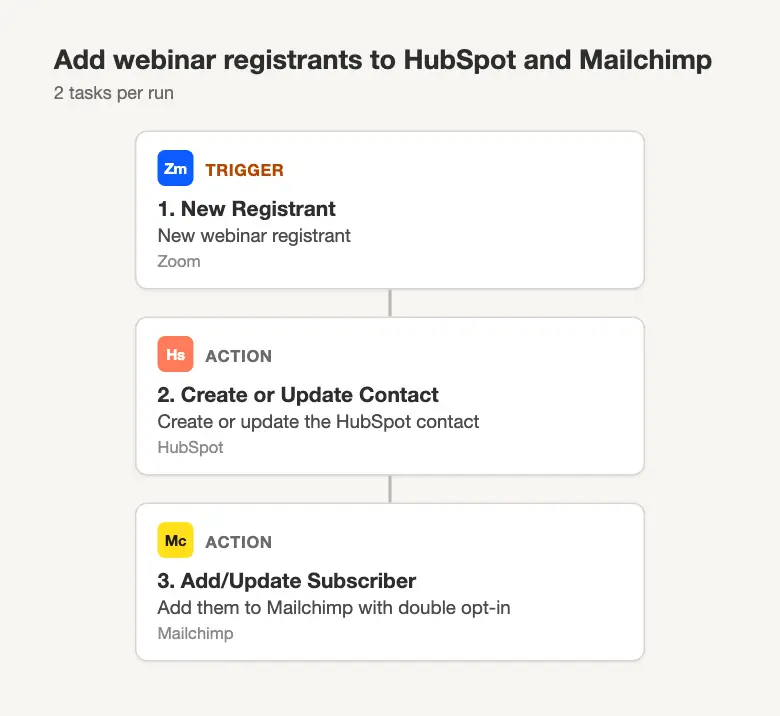
Step inspector
The first step shows the checked-in sample payload.Later steps name the node. They are not a live execution.
Guardrails
No approval, retry, or demo-gate node was detected by name. Read the README before connecting live credentials.
Credential ids in the JSON are placeholders. These files are portfolio demos.
Deploy this for your business
Tell us this slug and what still happens by hand. We will map it onto your accounts. This page is not a claim that the blueprint already runs for a customer.
README
Portfolio demo by Mustafa (mustafaautomation). Not client work. The people, companies, and numbers in it are made up. Rebuild it in your own Zapier account. Nothing here is connected to anyone's account.
Category: Lead gen and CRM
Difficulty: beginner
Apps: Zoom, HubSpot, Mailchimp
Zapier plan: Professional (multi-step Zap: 2 steps after the trigger)
Tasks per run: 2
Test status: passing (schema, mapping scope, task count)
Problem
Webinar registrants are some of the warmest leads, but they sit in a Zoom report until someone exports it after the event, and the follow-up email goes out days late to a list that never confirmed it wanted marketing.
Who it's for
Marketers and founders who run Zoom webinars, track leads in HubSpot, and send newsletters from Mailchimp.
How the Zap runs
flowchart TD
  s1["1. Zoom: New Registrant<br/>New webinar registrant"]
  s2["2. HubSpot<br/>Create or update the HubSpot contact"]
  s1 --> s2
  s3["3. Mailchimp<br/>Add them to Mailchimp with double opt-in"]
  s2 --> s3
Build it in the Zapier editor
Zapier has no import file for a Zap like this one, so it is built by hand from the steps below. zap.json is the same Zap in a machine-readable form (schema), and zap.yaml is the same document in YAML.
A value like [2. vendor] means: click the field, open step 2 in the data picker, and choose vendor. Plain text is typed as shown. YOUR_... is a value from your own account.
Before you start
- Have these ready from your own accounts:
YOUR_MAILCHIMP_AUDIENCE,YOUR_WEBINAR.
Steps
1. Trigger: New webinar registrant
App: Zoom · Event: New Registrant · instant (the app pushes each event to Zapier) · Tasks: 0
Fires each time someone registers for the chosen webinar.
| Field | Value |
|---|---|
| Webinar | YOUR_WEBINAR |
Fields this library maps from the trigger: registrant_id, meeting_topic, first_name, last_name, email, org, job_title, registered_at, join_url. Zapier shows them with its own labels; pick the one with the same meaning.
2. Action: Create or update the HubSpot contact
App: HubSpot · Event: Create or Update Contact · Tasks: 1
Records the webinar topic on the contact so sales can see which session they signed up for.
| Field | Value |
|---|---|
| [1. email] | |
| First Name | [1. first_name] |
| Last Name | [1. last_name] |
| Company Name | [1. org] |
| Job Title | [1. job_title] |
| Last webinar registered (custom property) | [1. meeting_topic] |
Later steps can map: id, is_new.
3. Action: Add them to Mailchimp with double opt-in
App: Mailchimp · Event: Add/Update Subscriber · Tasks: 1
Registering for a webinar is not consent to a newsletter, so double opt-in is on: Mailchimp asks them to confirm before they get marketing email.
| Field | Value |
|---|---|
| Audience | YOUR_MAILCHIMP_AUDIENCE |
| Subscriber Email | [1. email] |
| First Name | [1. first_name] |
| Last Name | [1. last_name] |
| Double Opt-In | Yes |
| Update Existing | Yes |
| Tags | webinar-registrant |
Later steps can map: id, status.
Test it
Use sample-trigger.json as the test record. For an instant or webhook trigger, send it to the trigger once; for a polling trigger, create a matching record in the app and click Test trigger. Then test each step in order and read its output before you turn the Zap on.
{
  "registrant_id": "reg_7Hq2LpX9",
  "meeting_topic": "Speed to lead: replying in under five minutes",
  "first_name": "Tomas",
  "last_name": "Berg",
  "email": "tomas.berg@initech.example",
  "org": "Initech",
  "job_title": "Sales Manager",
  "registered_at": "2026-11-23T19:44:02Z",
  "join_url": "https://zoom.example/w/EXAMPLE0001"
}
Plan and task usage
| Step | App | Tasks |
|---|---|---|
| 1. New webinar registrant | Zoom | 0 |
| 2. Create or update the HubSpot contact | HubSpot | 1 |
| 3. Add them to Mailchimp with double opt-in | Mailchimp | 1 |
A typical run uses 2 tasks. Zapier does not charge tasks for triggers, Filter, Paths, Formatter, Delay, Looping, Digest, Storage, or Zapier Tables steps. AI by Zapier is counted here as 1 task; Zapier prices it by model tier, so a larger model can cost more.
Minimum plan: Professional, because of: multi-step Zap: 2 steps after the trigger. The Free plan only runs two-step Zaps (a trigger and one action) and leaves out Filters, Paths, Formatter, webhooks, AI by Zapier, and premium apps.
Customize
- Add a second tag per session with a Formatter Text → Lowercase and Replace step on the topic, if you run a series.
- Turn double opt-in off only where your registration page already collects explicit marketing consent.
Limits
- Zoom only offers this trigger for webinars and registration-enabled meetings.
Time saved
About 20 minutes of export and import per webinar, and the follow-up list is ready the moment the session ends.
Files
| File | What it is |
|---|---|
zap.json | The Zap, step by step, in schema 1.0.0. |
zap.yaml | The same document in YAML. |
sample-trigger.json | Fictional trigger record for the first test. |
diagram.png | The step list, drawn like the Zapier editor. |