MakeChecked blueprint10 nodes
AI email triage and draft replies
Classify a new Gmail message and leave a draft reply for sales, billing, or support instead of sending it.
Portfolio reference build with demo data and placeholder credentials, not a client deployment.
Pain
Stops the inbox from taking the first two hours of the morning. The blueprint tags threads, flags urgent ones to Slack, and writes a draft.
Solution
Classify a new Gmail message and leave a draft reply for sales, billing, or support instead of sending it.
Impact · From the blueprint
Sorting plus a first draft is about 4 minutes a message. A 30-message morning is two hours.
- Intermediate
- Validated
- Draft / approval
- Gmail
- OpenAI
- Slack
- Google Sheets
Library status: documented blueprint, structurally validated. Checked against Make's blueprint shape and a module allowlist. Not imported into a Make account.
Step inspector
The first step shows the checked-in sample payload.Later steps name the node. They are not a live execution.
Guardrails
- Classify and draft
- Draft in the right voice
- Draft the sales reply
- Draft the billing reply
- Draft the support reply
Credential ids in the JSON are placeholders. These files are portfolio demos.
Deploy this for your business
Tell us this slug and what still happens by hand. We will map it onto your accounts. This page is not a claim that the blueprint already runs for a customer.
README
Portfolio demo by Mustafa (mustafaautomation). Not client work. Connect your own accounts after import. Live walkthroughs, when published, sit on a subdomain of quvantic.com.
Category: Email
Difficulty: intermediate
Apps: Gmail, OpenAI, Slack, Google Sheets
Test status: documented blueprint, structurally validated
Problem
A shared inbox mixes quotes, invoices, and password resets. People answer the loud ones and miss the quotes. This demo classifies each message and writes a draft in the right voice. It does not send. A human still hits send, which is the point.
Who it's for
Operators who share one Gmail mailbox across sales and support and are nervous about auto-send.
Module-by-module walkthrough
Ids match the blueprint. A router runs every route whose filter passes. An error handler runs only when that module throws.
1. Watch the shared inbox
google-email:TriggerWatchEmails · Watch emails · Gmail
Unread mail in the inbox, five at a time.
q:"in:inbox is:unread -category:promotions"maxResults:5
2. Classify and draft
openai-gpt-3:CreateCompletion · Create a completion · OpenAI
One JSON object with intent and a short reply in plain sentences. No markdown.
select:"chat"model:"gpt-4o-mini"max_tokens:"600"temperature:"0.2"messages:[{"role": "system", "content": "You triage a shared inbox. Return JSON only with keys intent (sales, billing, support, or review), summary (one sentence), and reply (a short plain-text email body). Do not promise refu...
3. Alert triage — error handler
slack:CreateMessage · Send a message · Slack
Email triage model failed for {{mail.subject}}.
channelWType:"list"channelType:"public"channel:""text:"Email triage model failed for {{1.subject}}."mrkdwn:trueparse:false
4. Resume — error handler
builtin:Resume · Resume · Flow control
The model failed. Substitute a review classification so the message is still drafted for a person.
result:"{\"intent\":\"review\",\"summary\":\"Model unavailable\",\"reply\":\"Thanks for the note. A person on the team will reply shortly.\"}"
5. Parse the classification
json:ParseJSON · Parse JSON · JSON
Exposes intent, summary, and reply.
json:"{{2.result}}"
6. Log the classification
google-sheets:addRow · Add a row · Google Sheets
You can audit what the model thought before anyone edits the draft.
from:"drive"mode:"select"spreadsheetId:""sheetId:""includesHeaders:trueinsertDataOption:"INSERT_ROWS"valueInputOption:"USER_ENTERED"values:{"0": "{{now}}", "1": "{{1.from}}", "2": "{{1.subject}}", "3": "{{5.intent}}", "4": "{{5.summary}}"}
7. Draft in the right voice
builtin:BasicRouter · Router · Flow control
Three intent routes plus a catch-all. Routes are filtered, so only one draft is created.
8. Draft the sales reply — route Sales
google-email:ActionCreateDraft · Create a draft · Gmail
Uses the model's reply body. Subject keeps the original thread subject.
Filter Sales: [[{"a": "{{5.intent}}", "o": "text:equal", "b": "sales"}]]
from:""to:["{{1.from}}"]cc:[]bcc:[]replyTo:""subject:"Re: {{1.subject}}"html:"<p>{{5.reply}}</p>"attachments:[]
9. Draft the billing reply — route Billing
google-email:ActionCreateDraft · Create a draft · Gmail
Same reply field, different route so finance can be notified.
Filter Billing: [[{"a": "{{5.intent}}", "o": "text:equal", "b": "billing"}]]
from:""to:["{{1.from}}"]cc:[]bcc:[]replyTo:""subject:"Re: {{1.subject}}"html:"<p>{{5.reply}}</p>"attachments:[]
10. Ping finance — route Billing
slack:CreateMessage · Send a message · Slack
Billing mail should not wait on the sales channel.
channelWType:"list"channelType:"public"channel:""text:"*Billing mail* from {{1.from}}: {{5.summary}}"mrkdwn:trueparse:false
11. Draft the support reply — route Support
google-email:ActionCreateDraft · Create a draft · Gmail
Support copy stays in the draft. No ticket is opened in this scenario.
Filter Support: [[{"a": "{{5.intent}}", "o": "text:equal", "b": "support"}]]
from:""to:["{{1.from}}"]cc:[]bcc:[]replyTo:""subject:"Re: {{1.subject}}"html:"<p>{{5.reply}}</p>"attachments:[]
12. Ask someone to read it — route Review
slack:CreateMessage · Send a message · Slack
Runs only when the model returned review. The sheet still has a row if the label is something else.
Filter Review: [[{"a": "{{5.intent}}", "o": "text:equal", "b": "review"}]]
channelWType:"list"channelType:"public"channel:""text:"*Read this mail* {{1.subject}} from {{1.from}}. {{5.summary}}"mrkdwn:trueparse:false
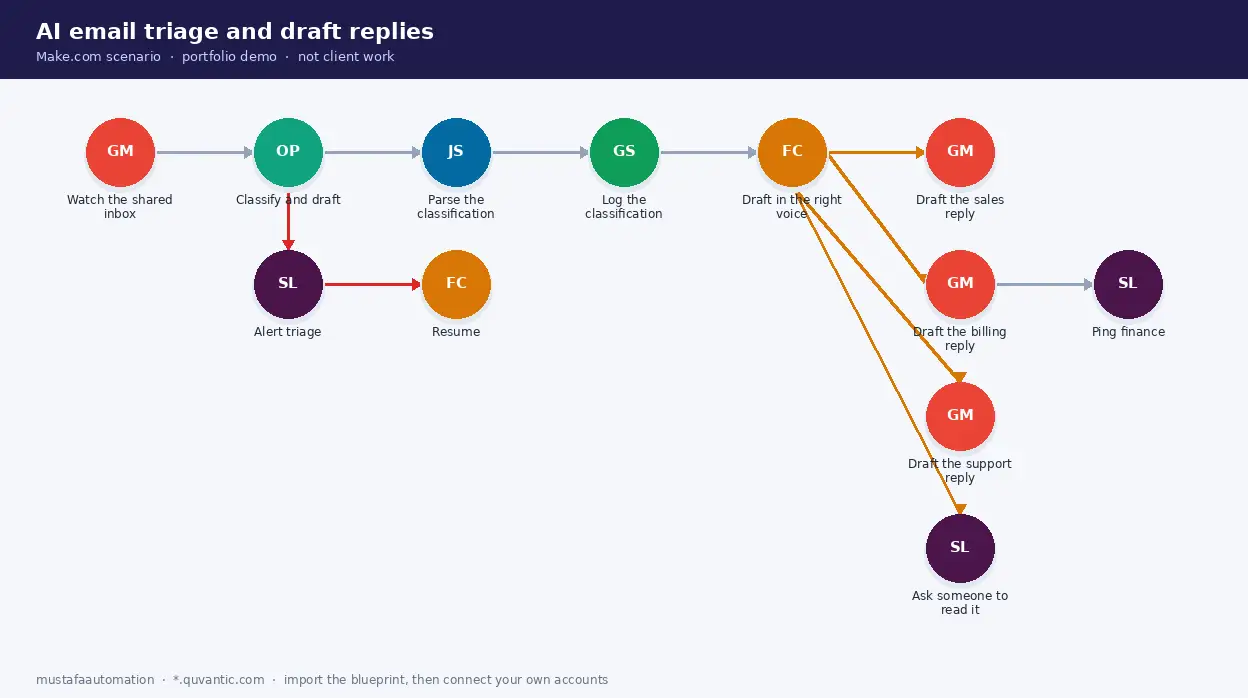
Diagram
flowchart LR
  mail(("1 · Watch the shared inbox"))
  triage(("2 · Classify and draft"))
  mail --> triage
  triage -->|"error"| triage_alert
  triage_alert(("3 · Alert triage"))
  triage_directive(("4 · Resume"))
  triage_alert --> triage_directive
  parsed(("5 · Parse the classification"))
  triage --> parsed
  log(("6 · Log the classification"))
  parsed --> log
  intent{"7 · Draft in the right voice"}
  log --> intent
  sales(("8 · Draft the sales reply"))
  intent -->|"Sales"| sales
  billing(("9 · Draft the billing reply"))
  finance(("10 · Ping finance"))
  billing --> finance
  intent -->|"Billing"| billing
  support(("11 · Draft the support reply"))
  intent -->|"Support"| support
  review(("12 · Ask someone to read it"))
  intent -->|"Review"| review
Setup
- In Make, create a scenario, open the three-dot menu at the bottom of the editor, and choose Import Blueprint. Select
blueprint.json. - Open every red module and pick or create the connection. Red means the account is not selected yet.
- Schedule: Every 10 minutes.
- Create the spreadsheet tab this scenario expects, with a header row in row 1:
- A received_at
- B from
- C subject
- D intent
- E summary
- Select that spreadsheet and sheet on every Google Sheets module. The ids are blank in the file.
- Run once with the bundled
sample-input.json. Fictional payload. Paste it into the first module when you run the scenario once. - Check the output bundle of each module before you turn the schedule on.
Connections
- Gmail — create a connection and select it on every Gmail module. The blueprint leaves
__IMTCONN__unset on purpose. - OpenAI — create a connection and select it on every OpenAI module. The blueprint leaves
__IMTCONN__unset on purpose. - Slack — create a connection and select it on every Slack module. The blueprint leaves
__IMTCONN__unset on purpose. - Google Sheets — create a connection and select it on every Google Sheets module. The blueprint leaves
__IMTCONN__unset on purpose.
Nothing in the file is a live connection id, webhook URL, or API key. Make rejects another team's connection id at import, so the slots are empty on purpose.
Data mapping
References use the module id: {{1.subject}} is the subject field of module 1. Sheets columns are zero-based and backticked ({{1.0}} is column A) so a renamed header does not break the map.
- Intent is one of sales, billing, support, or review. Each route uses text:equal, so a message takes one route. An unexpected label is only in the sheet.
- If the model is down, Resume feeds a fixed JSON document so the mail is drafted as a review instead of vanishing.
Error handling
Scenario settings: maxErrors 3, dlq false, sequential false, autoCommit true. After this many consecutive failed runs Make deactivates a scheduled scenario.
- Module 2 (Classify and draft) handles errors with
builtin:Resume. The model failed. Substitute a review classification so the message is still drafted for a person. - Router 7 (Draft in the right voice) Three intent routes plus a catch-all. Routes are filtered, so only one draft is created.
- Sales. Draft a sales reply. Filter: Sales.
- Billing. Draft a billing reply and ping finance. Filter: Billing.
- Support. Draft a support reply. Filter: Support.
- Review. Do not guess. Ask a person. Filter: Review.
- Module 8 runs only when filter Sales passes. A blocked bundle stops on that path. It is not an error.
- Module 9 runs only when filter Billing passes. A blocked bundle stops on that path. It is not an error.
- Module 11 runs only when filter Support passes. A blocked bundle stops on that path. It is not an error.
- Module 12 runs only when filter Review passes. A blocked bundle stops on that path. It is not an error.
Customization
- Tighten the Gmail query so newsletters never enter, for example
-category:promotions. - Replace each draft body with your own snippets. The structure of the router can stay.
- Turn a draft module into Send an email only after you have watched a week of drafts.
- Duplicate the scenario before you change the prompt, so you can diff against this demo later.
Time saved
Sorting plus a first draft is about 4 minutes a message. A 30-message morning is two hours.
Files
| File | What it is |
|---|---|
blueprint.json | Import this into Make. |
sample-input.json | Fictional bundle for the first run. |
diagram.png | Flow diagram. |
diagram.mmd | Mermaid source for the same flow. |